POS Network Segmentation: Separate Devices Safely
Separate POS, staff, guest, and IoT traffic without breaking payment terminals, network printers, or local device discovery.
- Written by
- Clayton Wingfield
- Reviewed by
- Clayton Wingfield
- Originally published
- Jul 31, 2026
- Last reviewed
- Jul 31, 2026

Quick verdict
Group POS devices and required local peripherals in one protected zone, separate staff, guest, IoT, and management traffic, then migrate and verify one checkout path at a time.
- Best for
- Retail, hospitality, and service businesses with guest Wi-Fi, connected facilities devices, multiple registers, or a need to limit payment-system exposure.
- Avoid if
- No one can document the current network, recover its configuration, or validate payment and peripheral behavior during a controlled maintenance window.
POS network segmentation should separate devices by trust and operational purpose while preserving the local connections a checkout actually needs. A practical small-business design usually keeps payment and POS devices in one protected zone, staff computers in another, guests on an internet-only network, and cameras or other connected equipment in an IoT zone.
Do not start by creating VLANs during business hours. First map which devices must communicate, document the working configuration, and prepare a rollback. A separate Wi-Fi name is not proof of isolation, and a VLAN by itself does not establish PCI DSS compliance.
Decide what must be separate and what must still connect
Use device function and required communication—not ownership or physical location—to define each zone:
- POS and payment: registers, payment terminals, and the local peripherals they must discover.
- Staff and back office: manager computers, payroll devices, inventory workstations, and ordinary employee endpoints.
- Guest: customer devices with internet access but no route to private business networks.
- IoT and facilities: cameras, displays, speakers, thermostats, and other appliances that do not need access to checkout data.
- Network management: the limited administrator path used to manage the gateway, switches, and access points.
The important exception is local POS hardware. Some payment terminals, receipt printers, and scanners rely on same-network discovery or peer-to-peer traffic. Moving every component into a different VLAN can improve the diagram while breaking checkout.
Shopify's current POS network guidance says Shopify POS devices and Wi-Fi or Ethernet peripherals such as POS Terminal and network receipt printers must be on the same network. Shopify also says its POS Terminal requires local peer-to-peer communication. Square's network requirements document internet access needs plus separate local ports used by network printers.
Treat those vendor requirements as dependencies to preserve, not reasons to leave the entire business on one flat network.
Build a dependency map before changing the network
Inventory one location at a time. For every connected device, record:
- Device purpose, owner, model, and connection type
- Current switch port or Wi-Fi network
- IP address source, such as DHCP or a reservation
- Internet destinations and services it requires
- Local devices it must discover or reach
- Management path and authorized administrator
- Failure behavior when internet or local peers are unavailable
- The test that proves it still works after a move
Include less obvious dependencies: DNS, time synchronization, cloud management, network printing, kitchen displays, inventory integrations, remote support, and cellular failover. If a vendor publishes required domains, protocols, or ports, use the current vendor page rather than copying an old firewall list from another site.
Also record pending offline transactions before maintenance. A network change can trigger sign-outs, reconnects, or resets that are unsafe while transactions have not uploaded. The recovery guidance in Square's Terminal troubleshooting warns that some disruptive actions can permanently lose pending offline payments.
Use a safer POS network segmentation design
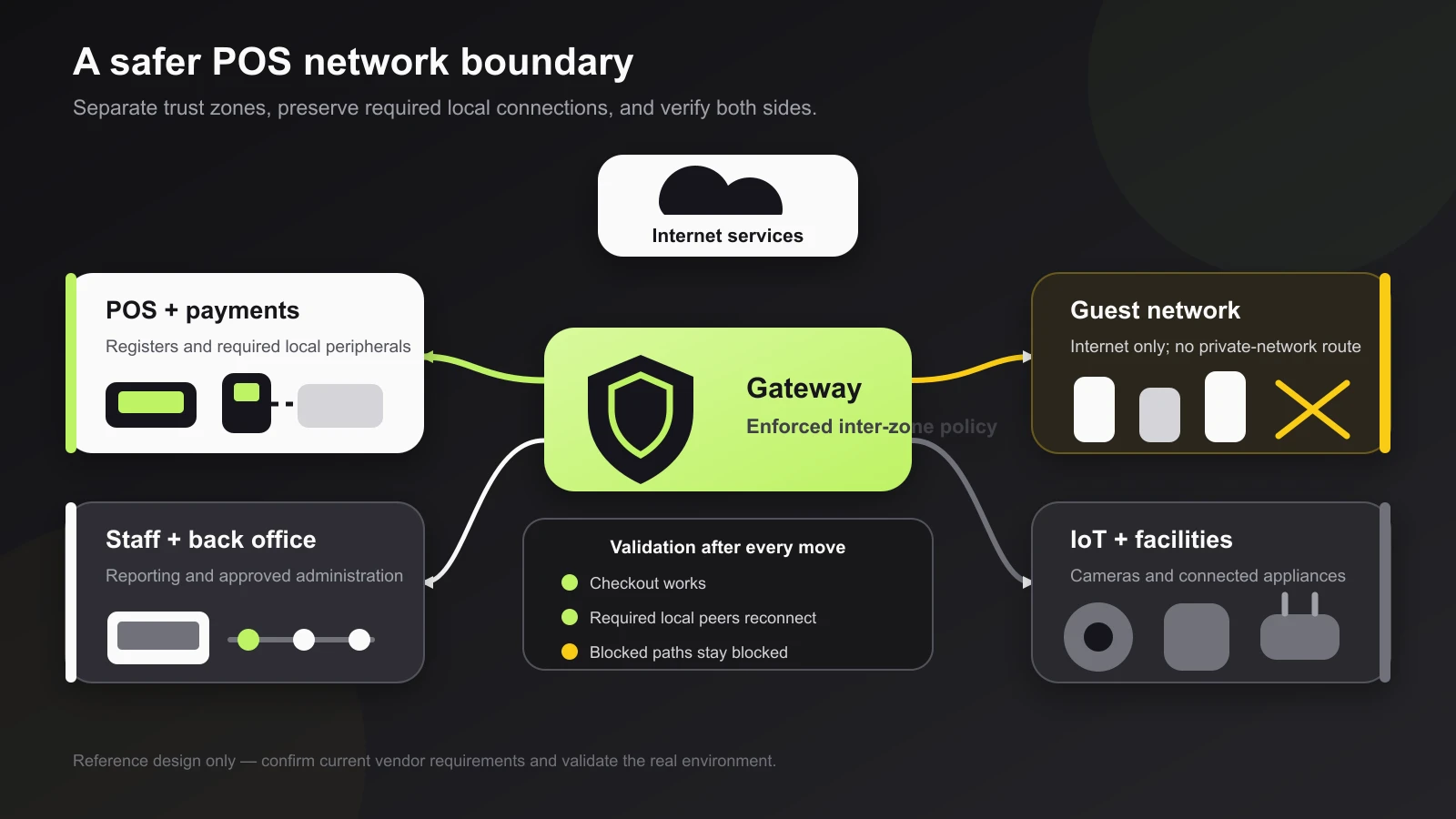
A small-business reference design needs four controls:
- Separate address spaces. Give each trust zone its own non-overlapping subnet.
- Explicit membership. Map wired switch ports and wireless SSIDs to the correct zone. A second SSID that returns devices to the same subnet does not create a useful boundary.
- A policy-enforcement point. Route traffic between zones through a gateway or firewall that can apply rules and log denials.
- A verified rule set. Allow the smallest documented communication set, then test the real checkout workflow.
Start with guest access as the clearest boundary: internet access should work, while private business subnets and network-management interfaces should not be reachable. Use client isolation when the platform supports it so guest devices cannot communicate with each other.
For the POS zone, allow required internet services and the documented local relationships between a register and its peripherals. Block broad access from guest and IoT zones into POS. Staff access should be limited to the exact management or reporting flows the business needs, not unrestricted simply because the device belongs to an employee.
Keep network management separate from daily browsing. Only designated administrative devices should reach the gateway, switches, and access points. CISA's network-hardening guidance recommends segmentation using controls such as router access lists, stateful inspection, firewalls, and VLANs as part of defense in depth.
Migrate one working path at a time
Plan the cutover outside sales hours and keep a known-good export or screenshot of the existing configuration.
- Update the device and dependency inventory.
- Back up supported gateway, switch, and access-point configurations.
- Create the new subnets and zones without moving production devices.
- Define DHCP, DNS, time, internet, and inter-zone policies.
- Map one test switch port or Wi-Fi network to the POS zone.
- Move one complete checkout path, including any local peripheral it must discover.
- Test a normal transaction, receipt or kitchen print, inventory sync, sign-in, and reboot recovery.
- Test that guest and IoT devices cannot reach the protected zone or management interfaces.
- Move the remaining devices in small groups, checking the same evidence after each group.
- Save the final configuration, network diagram, device list, and rollback notes.
Do not combine segmentation, firmware upgrades, IP renumbering, new Wi-Fi authentication, and a POS application upgrade in one maintenance window. Each extra variable makes failure isolation harder.
Verify both security and checkout behavior
Passing an internet speed test is not enough. Verify the complete operating path:
- The POS device obtains the expected address, DNS, and time.
- The payment terminal pairs and reconnects after a restart.
- Network printers are discoverable and receive the correct job.
- Barcode scanners, displays, and other local peripherals behave normally.
- Sales, inventory, and receipts synchronize to the intended account and location.
- Required cloud status and support functions work.
- A guest device reaches the internet but not POS, staff, IoT, or management addresses.
- An IoT device cannot initiate a connection into the POS zone.
- Only the approved administrator path reaches network controls.
- Primary-internet failure and recovery do not bypass the intended boundaries.
Repeat key tests after a reboot and after the DHCP lease changes. A rule tied to a temporary address can appear correct until the device receives a new one.
If the location uses backup internet, check the Devicefield guide to POS internet failover before testing. Failover should preserve isolation and necessary outbound access, not replace the segmented policy with a permissive emergency path.
Diagnose failures without removing every boundary
When segmentation breaks a workflow, identify which dependency failed.
A terminal or printer disappears
Confirm the POS host and required peripheral are in the vendor-supported relationship. Shopify POS Terminal, for example, requires the POS device and terminal on the same local network with peer-to-peer communication available. Move the affected pair back to the known-good zone while you revise the design; do not open access from every network.
The POS has an address but cannot sign in
Test DNS, correct time, HTTPS, and vendor-required destinations. Square notes that its devices require NTP and HTTPS, and that incorrect time can cause certificate-validity failures. Compare the current vendor requirements with the firewall log before adding a broad allow rule.
Local printing fails but payments work
Cloud access and local discovery are different paths. Check the printer address, POS-to-printer policy, discovery traffic, and whether both devices are on the required local network. Preserve evidence from firewall logs before changing multiple rules.
Guest devices can still reach business systems
Check the guest SSID-to-VLAN mapping, subnet assignment, inter-zone rules, and client-isolation setting. Test from a real guest device. A different network name with a private IP on the business subnet is a labeling change, not isolation.
For intermittent failures after a successful migration, use the POS connectivity diagnostic guide to separate Wi-Fi coverage, local network, internet edge, and vendor-service faults.
Understand the PCI DSS boundary
Network segmentation is valuable, but it is not a compliance shortcut. The PCI Security Standards Council's VLAN FAQ says adequately configured internal firewalls, routers with strong access controls, VLANs, or other technologies can support segmentation. It also says the result depends on the actual controls and environment.
PCI SSC has separately explained that segmentation is not itself a PCI DSS requirement, although adequate segmentation may reduce assessment scope. Its modern scoping and segmentation guidance emphasizes defining scope boundaries, maintaining an asset inventory, understanding complexity, and verifying controls.
Do not claim reduced scope because a switch shows different VLAN IDs. Ask the merchant's payment provider, assessor, or qualified security professional how the environment should be scoped and validated.
Account for equipment, labor, and recovery cost
A real deployment may require:
- A gateway or firewall that can enforce and log inter-zone policy
- Managed switches for tagged wired networks
- Access points that map wireless networks to the intended zones
- Configuration backup and monitoring
- Vendor support or an experienced network professional
- Maintenance time, staff training, and a rollback window
- PCI scoping or assessor help when applicable
The cheapest approach is not always new hardware. A capable existing gateway may already support the needed zones and policies. The expensive mistake is buying a managed switch without confirming that the router, access points, and support plan can enforce and maintain the entire design.
This project fits a business with multiple device classes, guest Wi-Fi, connected facilities equipment, or a need to limit the payment environment. Avoid a do-it-yourself live cutover when no one can explain the current network, recover the configuration, or validate the payment workflow.
Limitations of this guide
This is researched planning guidance, not a tested configuration. Devicefield did not inspect a live network, run a penetration test, validate PCI DSS scope, or configure Square, Shopify, firewall, switch, or wireless hardware. Exact discovery traffic, firewall destinations, authentication support, and compliance obligations vary by POS platform, hardware version, network product, region, processor, and business environment.
Frequently asked questions
Does a POS system need its own VLAN?
A dedicated POS VLAN can be a useful part of segmentation, but the goal is enforced isolation, not the VLAN label. The gateway rules, device membership, required local traffic, logging, and validation determine whether the boundary works.
Can POS and guest Wi-Fi share one internet connection?
Yes. They can share a WAN connection while using separate subnets, SSIDs or wired zones, and firewall policy. Guest devices should not receive a path to POS, staff, IoT, or management networks.
Why did network segmentation break a POS printer or terminal?
The device may require same-network discovery or peer-to-peer communication. Check the current POS vendor's requirements, keep the necessary device group together, and allow only the documented local path.
Does network segmentation make a business PCI compliant?
No. Segmentation can help isolate the cardholder data environment and may reduce assessment scope when it is adequate, but it does not prove compliance. Scope and controls must be assessed for the actual environment.
Compatibility notes
Systems, accessories, and constraints
The design must account for the exact POS platform, payment terminal, receipt and kitchen printers, scanners, local discovery, peer-to-peer traffic, DHCP, DNS, time, cloud destinations, Wi-Fi authentication, switch and access-point VLAN support, gateway policy, backup internet, and management path.
Testing methodology
How this article was evaluated
Reviewed current exact and close search results, PCI Security Standards Council guidance, CISA hardening guidance, current Square and Shopify network documentation, recent operator demand signals, and the complete Devicefield local and database inventory; organized the answer around dependencies, staged migration, two-sided validation, and compliance limits.
Known limitations
What this guide could not verify
Research-only. Devicefield did not inspect a live network, run a penetration test, validate PCI DSS scope, or configure Square, Shopify, firewall, switch, or wireless hardware. Requirements vary by vendor, hardware version, region, processor, and environment.
Sources
Documentation and references
- Can VLANs be used for network segmentation? - Supports the limits of VLANs alone, the role of internal firewalls and access controls, and the need to assess adequate PCI segmentation in context.
- PCI DSS Scoping and Segmentation Guidance for Modern Network Architectures - Supports asset inventory, boundary definition, complexity risk, and verification of segmentation controls.
- Council CTO Discusses Scoping and Segmentation Guidance - Supports the statement that segmentation is not itself a PCI DSS requirement and may reduce assessment scope when adequate.
- Enhanced Visibility and Hardening Guidance for Communications Infrastructure - Supports using router access controls, stateful inspection, firewalls, and VLANs together as defense-in-depth segmentation.
- Set up network requirements for Square hardware - Supports current Square HTTPS, NTP, DNS, domain, Wi-Fi authentication, and local network-printer requirements.
- Troubleshoot network connection on Square Terminal - Supports maintenance caution when pending offline payments exist and current Square Terminal network-recovery context.
- Setting up your network for Shopify POS - Supports same-network requirements for Shopify POS and locally connected peripherals, plus current firewall and network planning considerations.
- Setting up Shopify POS Terminal - Supports the current same-local-network, peer-to-peer, local-network-permission, and connectivity requirements for Shopify POS Terminal.
Devicefield checklist
Make the next hardware decision with fewer surprises.
Get practical buying notes, compatibility checks, and new troubleshooting guides.
Frequently asked questions
Does a POS system need its own VLAN?
A dedicated POS VLAN can be a useful part of segmentation, but the goal is enforced isolation, not the VLAN label. The gateway rules, device membership, required local traffic, logging, and validation determine whether the boundary works.
Can POS and guest Wi-Fi share one internet connection?
Yes. They can share a WAN connection while using separate subnets, SSIDs or wired zones, and firewall policy. Guest devices should not receive a path to POS, staff, IoT, or management networks.
Why did network segmentation break a POS printer or terminal?
The device may require same-network discovery or peer-to-peer communication. Check the current POS vendor’s requirements, keep the necessary device group together, and allow only the documented local path.
Does network segmentation make a business PCI compliant?
No. Segmentation can help isolate the cardholder data environment and may reduce assessment scope when it is adequate, but it does not prove compliance. Scope and controls must be assessed for the actual environment.